
2.2 KiB
LabelImg
LabelImg is a graphical image annotation tool. The source mainly comes from labelme.
It is written in Python and uses Qt for its graphical interface.
The annotation file will be saved as a XML file. The annotation format is PASCAL VOC format, and the format is the same as ImageNet
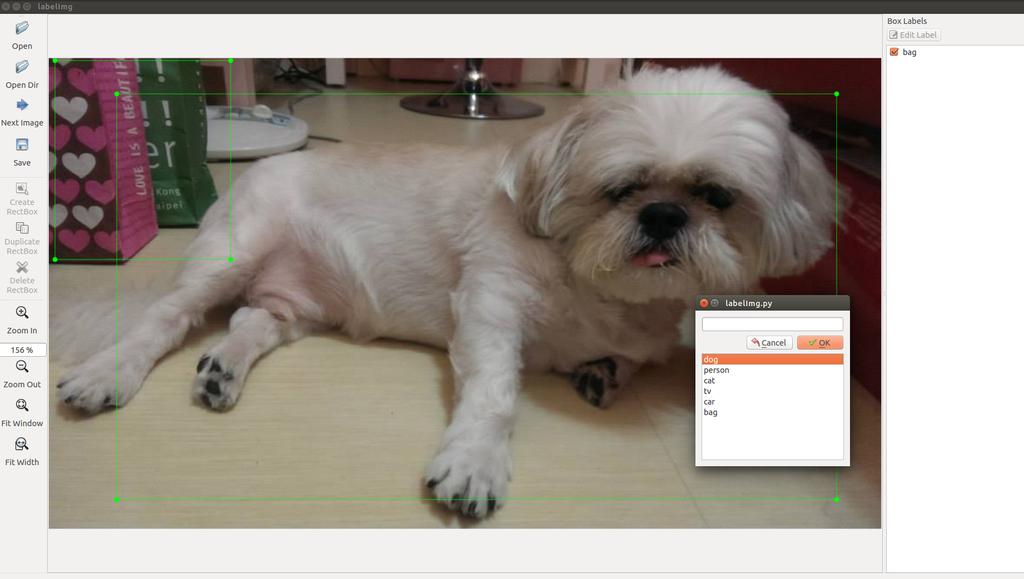
Dependencies
- Linux/Ubuntu/Mac
Requires at least Python 2.6 and has been tested with PyQt 4.8.
In order to build the resource and assets, you need to install pyqt4-dev-tools:
$ sudo apt-get install pyqt4-dev-tools
$ make all
$ ./labelImg.py
- Windows
Need to download and setup Python 2.6 or later and PyQt4. Open cmd and go to $labelImg,
$ pyrcc4 -o resources.py resources.qrc
$ python labelImg.py
Usage
After cloning the code, you should run make all to generate the resource file.
You can then start annotating by running ./labelImg.py. For usage
instructions you can see Here
At the moment annotations are saved as a XML file. The format is PASCAL VOC format, and the format is the same as ImageNet
You can also see ImageNet Utils to download image, create a label text for machine learning, etc
Create pre-defined classes
You can edit the data/predefined_classes.txt to load pre-defined classes
General steps from scratch
-
Build and launch.
make all; python labelImg.py -
Click 'Change default saved annotation folder' in Menu/File
-
Click 'Open Dir'
-
Click 'Create RectBox'
The annotation will be saved to the folder you specifiy
Hotkeys
-
Ctrl + r : Change the defult target dir which saving annotation files
-
Ctrl + n : Create a bounding box
-
Ctrl + s : Save
-
n : Next image
-
p : Previous image
How to contribute
Send a pull request and help me write setup.py to build executable file for all platforms.